Telegram. Social posts. Bet slips.
Copy. Paste. Bets logged.
Paste a Telegram tip, social post or bookmaker text into your free bet tracker. Or upload a screenshot. AI reads the details and logs your bets.
Illustrated example, not a live parse. Paste the message itself, including the date and stake, rather than just a link.
The same idea, with a screenshot
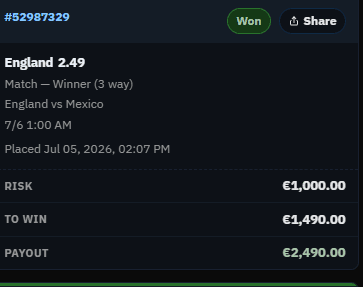
Here is a supplied bet slip and the details it contains.
The details to check
One slip, one record
- Event
- England vs Mexico
- Selection
- England
- Market
- Match winner (3 way / 1X2)
- Decimal odds
- 2.49
- Stake on the slip
- €1,000.00
- Result
- Won
Illustrated walkthrough: the fields above were read from the supplied screenshot. This is not a live parser result or a saved account record.
How to log bets from text or screenshots
Paste your text or attach a screenshot
Sign in and select the book where the bet belongs. Paste the copied message directly into the box. For an image, choose Attach screenshot, paste an image from your clipboard or drop it onto the box. Check that the right thumbnail appears.
Add context, then parse
If a date is unclear or you track stakes in units, add a short explanation alongside the image. Choose Parse bets. Am I Up uses Claude Haiku to read your text or image and automatically logs the extracted bets.
Check the saved bet
Compare the event, selection, odds, stake, date and result with the original. The success message offers Undo for 30 seconds. You can also edit a saved bet. AI can misread a slip, so check the details before relying on your totals.
A few useful details
Payout is not profit
This slip shows a €1,000 stake at decimal odds of 2.49. Its €2,490 payout includes the original stake. The profit is €1,490.
Check the stake convention in your book. If you use units, a €1,000 cash stake is not automatically 1,000 units. For example, at €100 per unit this would be 10 units staked and 14.9 units profit. Supply that context and verify the saved amount.
Two details this screenshot cannot settle
- The kickoff date and timezone. “7/6 1:00 AM” depends on the bookmaker’s date format and timezone. The separate “Placed Jul 05, 2026” timestamp is the placement time. Confirm the event date rather than treating those as interchangeable.
- The bookmaker. No bookmaker name is visible. Add it as context if you want it in your record; the slip’s colours are not enough to identify it reliably.
What screenshots can I upload?
The account parser accepts PNG, JPEG, WebP and GIF files, up to four images per request and 4 MB per image. Use a clear image showing the full selection, odds and stake. Daily AI parsing limits apply.
No bookmaker connection is required. The public homepage demo accepts text; sign in to import screenshots. For an existing spreadsheet, use the CSV or Excel importer instead.